These notes covers release information from the past month.(February 11 - March 4, 2026)Click here to sign up for monthly release emails. "Last uploaded" date for Facesheet photoAs of our April 1 release, the Facesheet displays a “Last uploaded” date beneath the resident photo to more easily demonstrate compliance with state regulations. The displayed date updates whenever the photo is uploaded or edited, including refocusing the image, ensuring the Facesheet always reflects most recent activity. 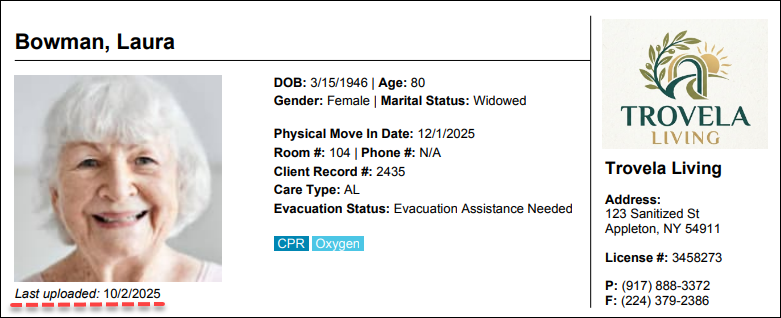 'All Residents' grid and search enhancementsAs of our April 1 release, the All Residents page has been updated with enhanced search capabilities and an improved grid to make it easier to scan, sort, and locate resident information. Users can now search additional resident details, such as Room Number, Advanced Directives, Product Type, or Classification. The grid visual and performance improvements include clearer row contrast, sortable column headers, faster loading, and better display on mobile devices. 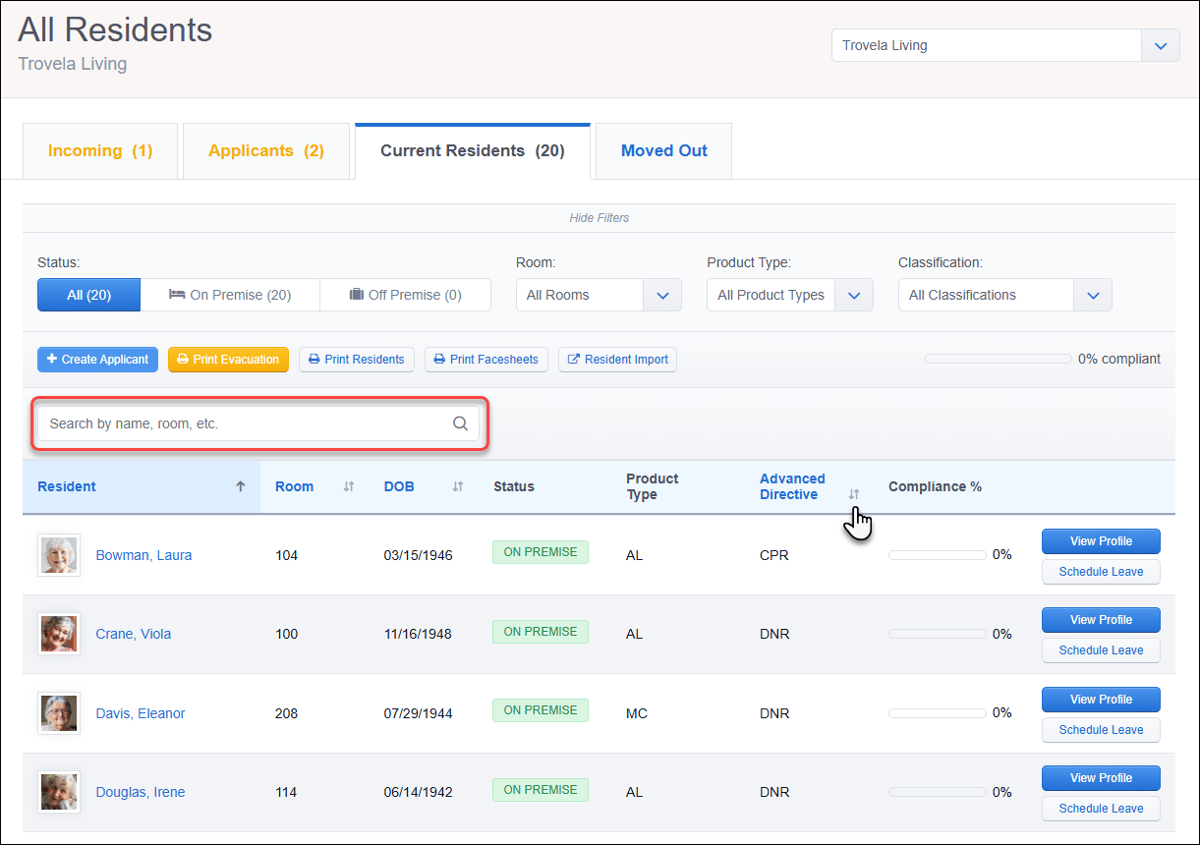 Customizable Meal Plans for ResidentsAs of our March 25 release, communities can now configure Meal Plan options for residents that are separate from Diet information. Meal Plans must first be added in Resident Settings in order to assign them to each resident using the new Meal Plan dropdown in their Health Profile. Please note that there are no default options to select Once assigned, the resident’s selected plan will appear alongside their name during Mealtime Attendance (if this feature is in use). Meal Plan information has also been added as a new column in the Resident Diet Roster report, including Excel and PDF exports. 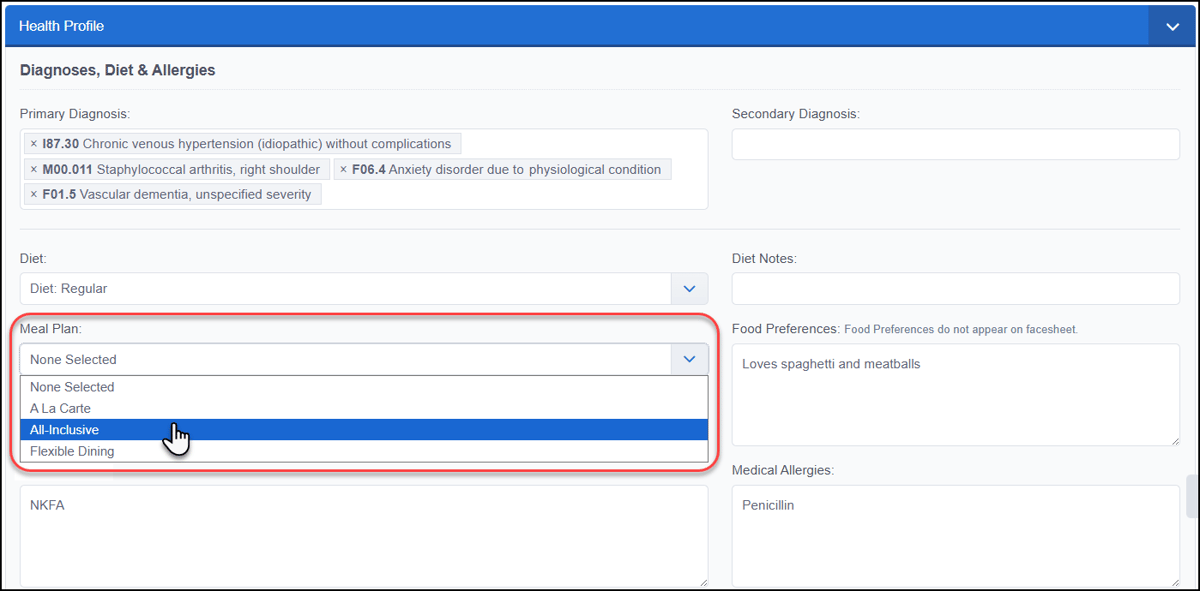 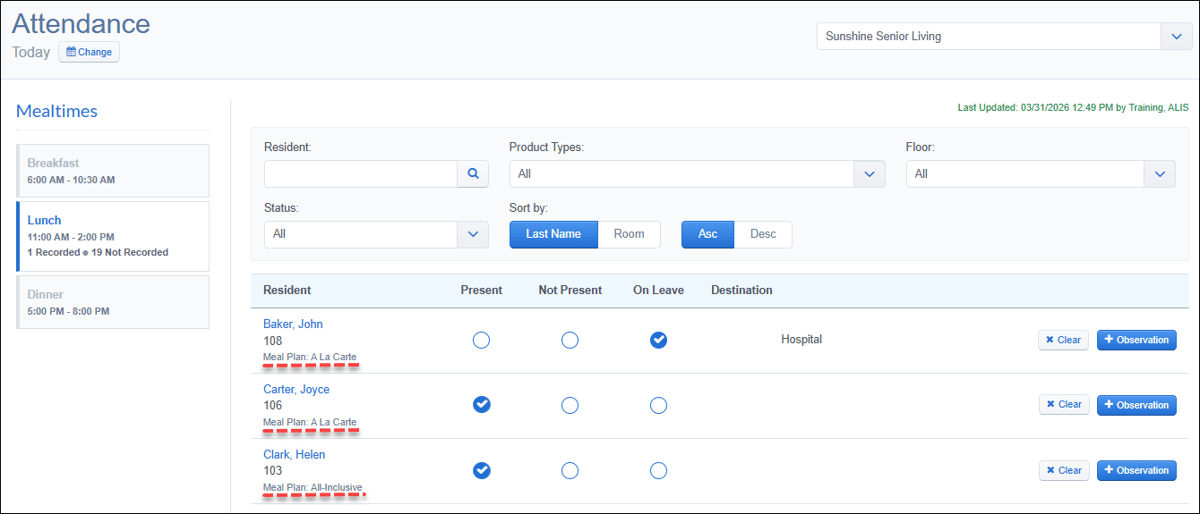 Resident and Staff names on Immunizations PDFsAs of our March 25 release, Immunization PDFs now include the resident or staff member name that the record belongs to. This name will appear when printing the record from the Immunizations section of a resident or staff profile, as well as when 'Vaccination Information' is chosen as part of a Resident Report Card PDF download. 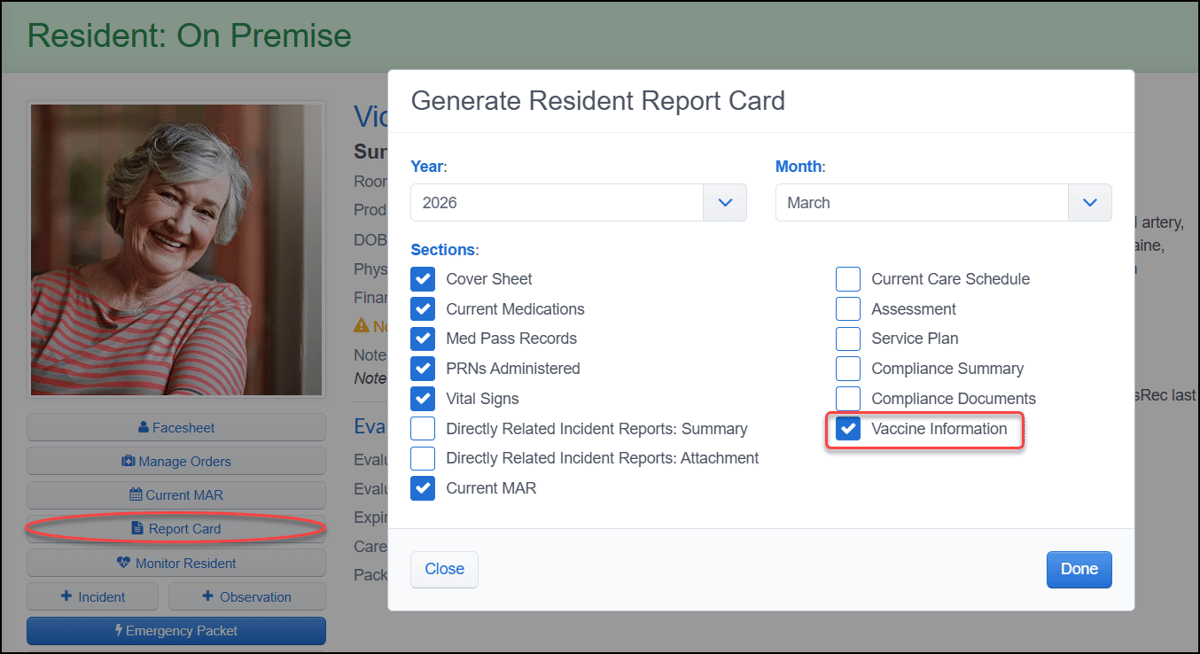 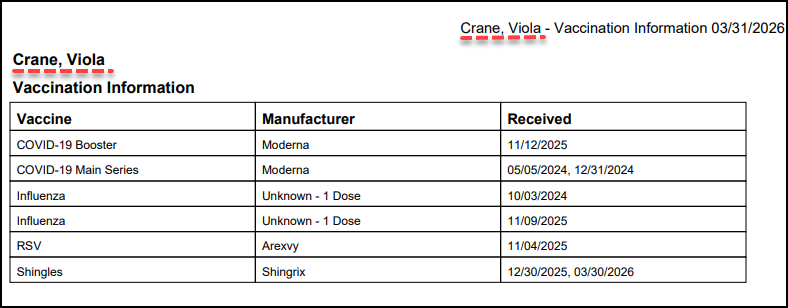 Contact your Account Manager for assistance with feature enablement or settings configuration.  Restrict or allow Care recording in previous shiftsAs of our March 25 release, a new Care setting provides more control over when staff can record care in shifts earlier than their default access, which includes the current shift, immediately preceding shift, and the upcoming shift. Recording care on historical dates (yesterday and earlier) is restricted unless the community enables the new Allow Care Recording in Previous Shifts setting. This new setting is disabled by default. If it remains disabled, administrators can still override the restriction as long as they have the specific security role permission. 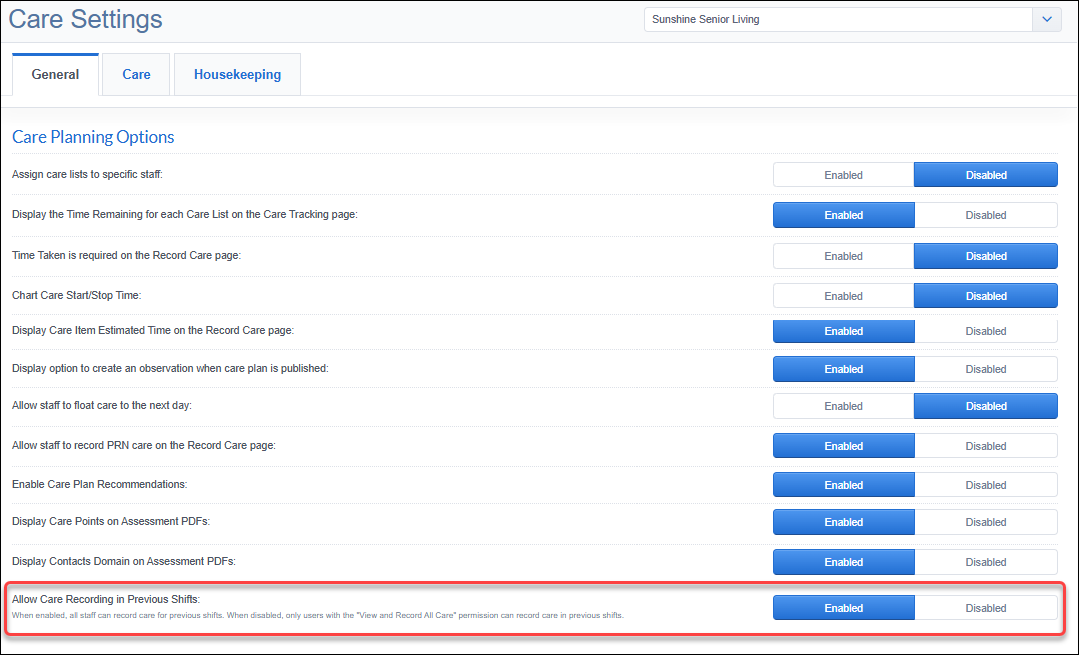 Contact your Account Manager for assistance with security role permissions or settings configuration.  Liberally-scheduled order MAR stamping updateAs of our April 1 release, liberally-scheduled medication administrations recorded during overnight shifts will now display on the date that the shift began. This applies to the MAR Editor and Filled MAR PDF. The Scheduled date shown in the create, edit, and record history views has also been updated to match this timing. This change provides clearer, more consistent documentation for orders administered during overnight shifts. 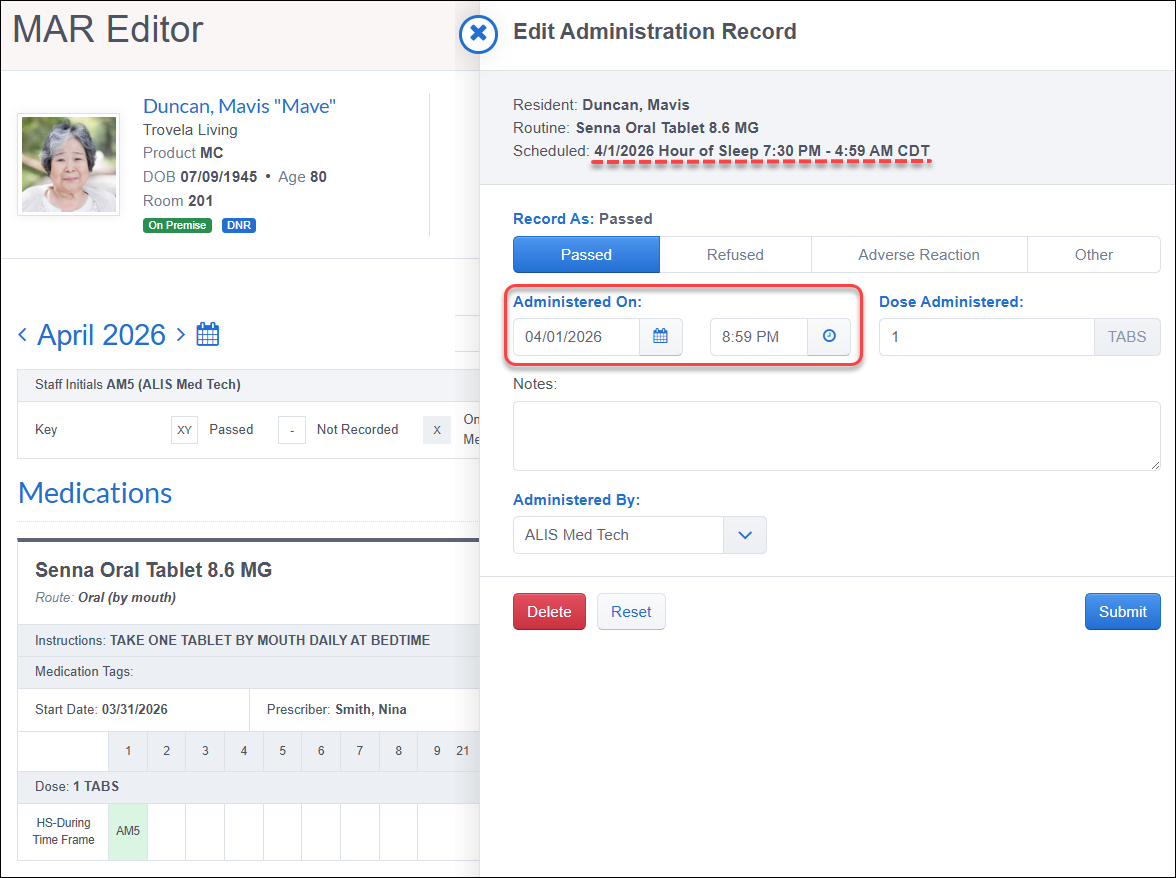 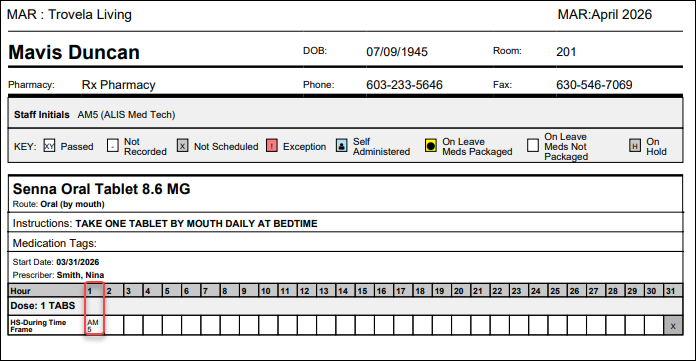 New help text for medication schedulingAs of our March 18 release, help text has been added to Routine and Treatment scheduling to clarify how medication schedules are calculated when processing, creating, or editing orders. When selecting an Interval of Every N Days, Every Other Week, or N Days On/Off, the new guidance explains that the Start Date anchors the specified schedule. 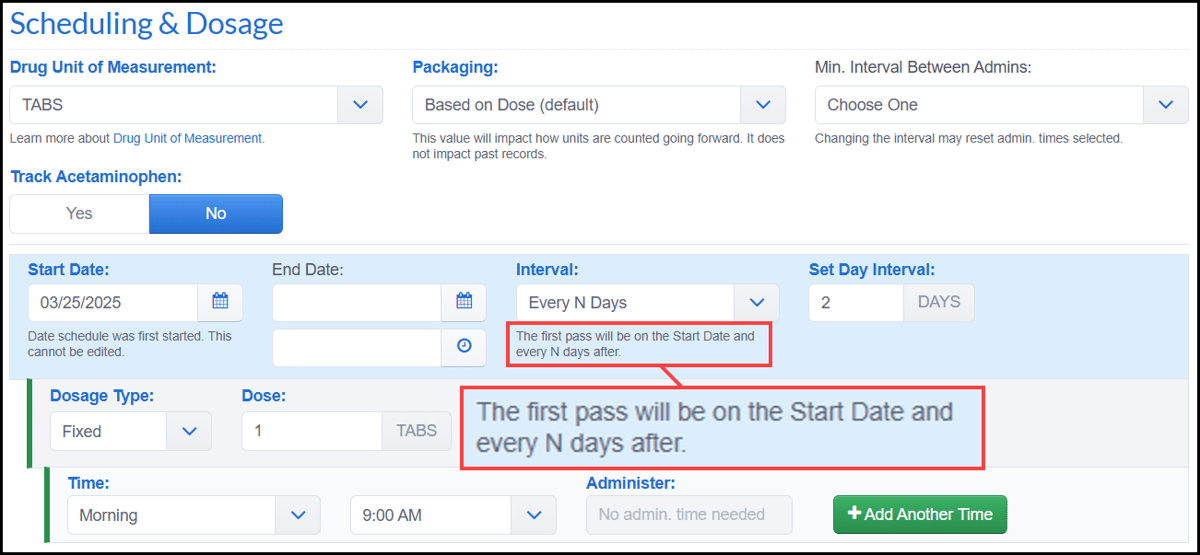 Free-form search for the Medication List reportAs of our March 18 release, the Medication List Report now includes a free-form 'Medication Name' search field to help users quickly locate medications. The search is case-insensitive and matches both display and generic names. This makes it easier to filter large medication lists and quickly find the information you need when reviewing or managing medications. 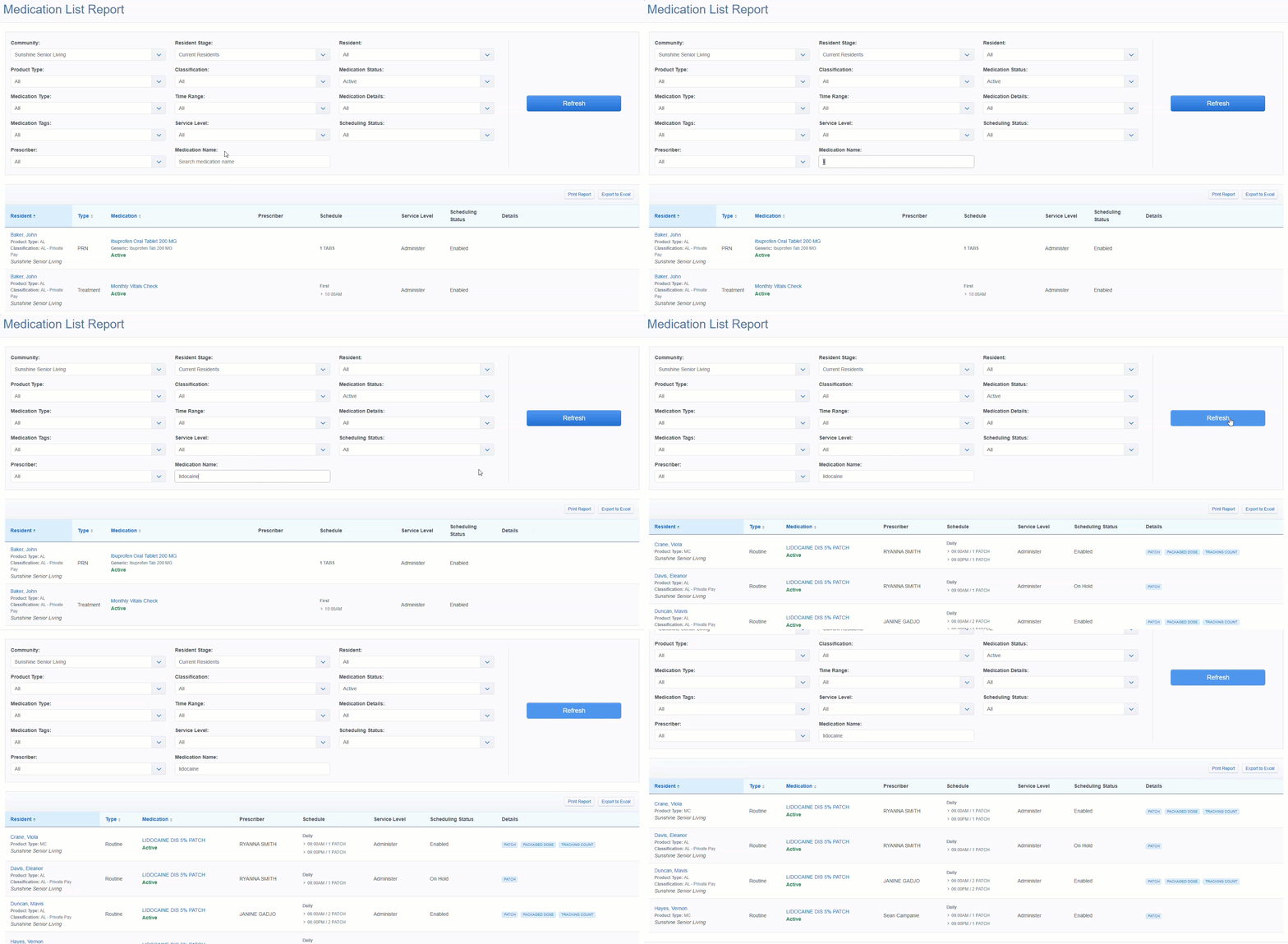 Order Instructions on Manage Orders main pageAs of our March 11 release, medication Instructions now appear directly on the Manage Orders page for Routine, PRN, and Treatment orders. The instructions display beneath the Prescriber line, with longer text shortened after 120 characters and expandable using + Show More. This allows staff to quickly view administration instructions without opening each individual order, making order review faster and more convenient. 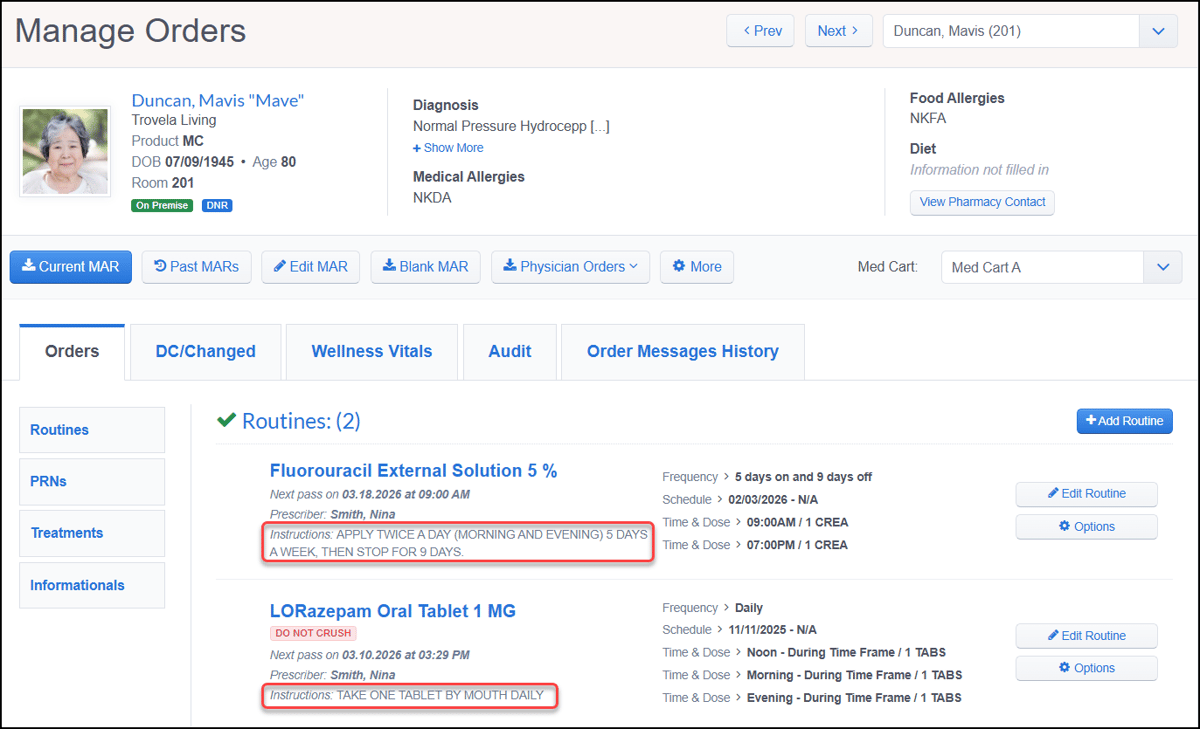 Updated 'Received On' date for pharmacy ordersAs of our March 11 release, the 'Received On' date for pharmacy orders now reflects when ALIS actually received the order message from the pharmacy, rather than when it became available for processing. This date appears in both Message History tabs in your Pharmacies inbox and on residents’ Manage Orders pages. This update provides a clearer timeline for when pharmacy orders were received, helping align system records with pharmacy activity and improve order tracking. 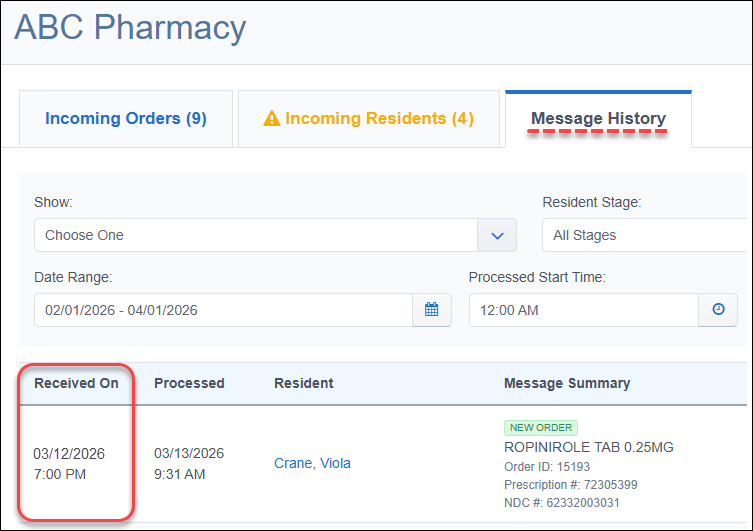 Medication Changes Report improvementsAs of our March 11 release, the Medication Changes Report has been expanded to include activity from Manage Orders pages and the Pharmacy Inbox. The new Source column in the report now shows where the change originated. Audit messages have also been enhanced to include helpful identifiers, such as Order ID, Rx number, and medication name when available. Updates apply to a variety of order changes, including new orders, updated orders, discontinuations, and auto-mapped or auto-processed messages. 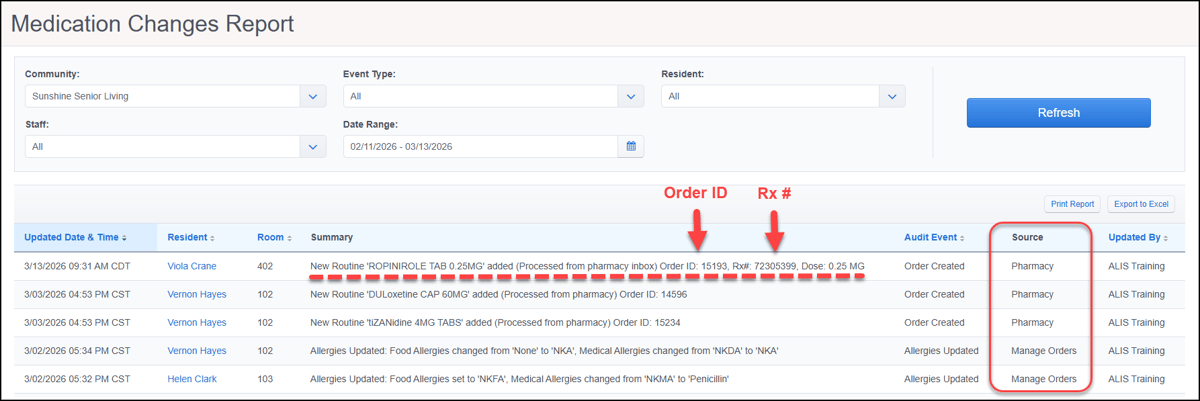  Disable payment methods for disabled/removed payersAs of our March 25 release, all payment methods associated with a payer will now be automatically disabled when that payer is disabled or removed. A warning message will appear to let users know that the payer’s associated payment methods will also be disabled. This update helps keep payment configurations aligned with payer status and prevents charges from being attempted for payers who should no longer be billed. 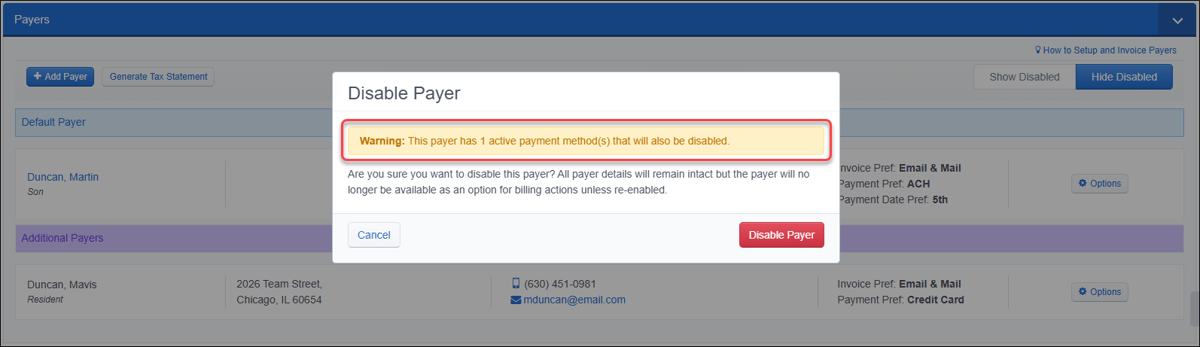  Gateway ACH/CC now reflects "Balance Due as of"As of our March 11 release, the Collect ACH/CC panel in the Payment Center now displays “Balance Due as of” instead of “Balance as of" to better align with billing teams think about outstanding balances. This update clarifies that the amount shown reflects the balance due for the selected date, helping users better understand the payment amount being collected. 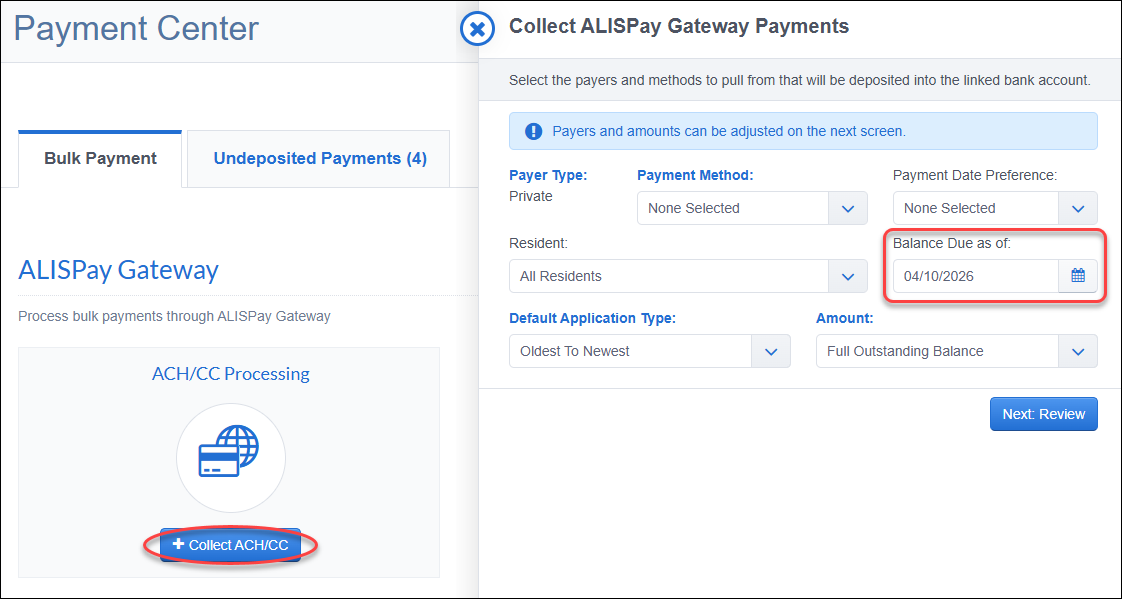  Track Prospects that are 'Lost to Competitor'As of our March 18 release, the ALIS CRM now includes a workflow to track when a prospect is lost to a competitor. After the feature entitlement is enabled for your community, users with access must add competitors names in the new CRM Settings → Competitors table. Editing any applicable Prospect Stages as 'Lost to Competitor' will then trigger the workflow. When a prospect is moved to one of these stages in the ALIS CRM, users are prompted to select the competitor and optionally add notes. This information is recorded in the Prospect Story, Audit History, and Stage Change History for clear visibility and can be updated when editing the profile. Competitor details for these stage changes are also available in Prospect Activity and Prospect Addresses reports, making it easier to review and analyze lost leads. 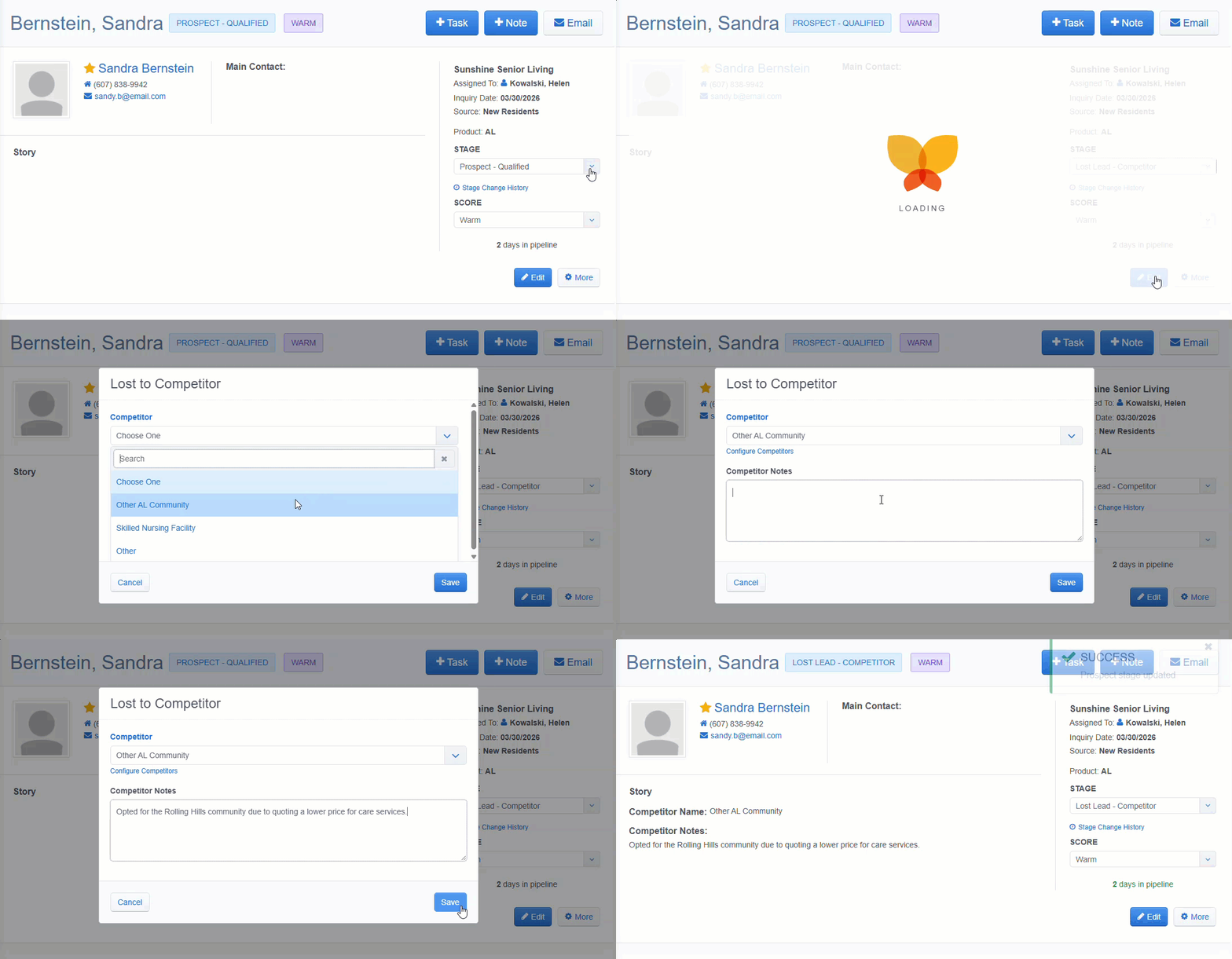 Auto-create tasks for new ProspectsAs of our March 11 release, sales teams can now automatically generate CRM tasks when a new prospect is created. This supports faster follow-up with new inquiries and helps standardize outreach workflows. In CRM Settings, enable the new "Automatically create for new prospects?" setting when adding or editing a task in the CRM Task Types grid. This allows specific task types to generate automatically when a new prospect is added Once enabled, the task is automatically created, assigned to the prospect’s sales agent, and given a due date set for the following day. 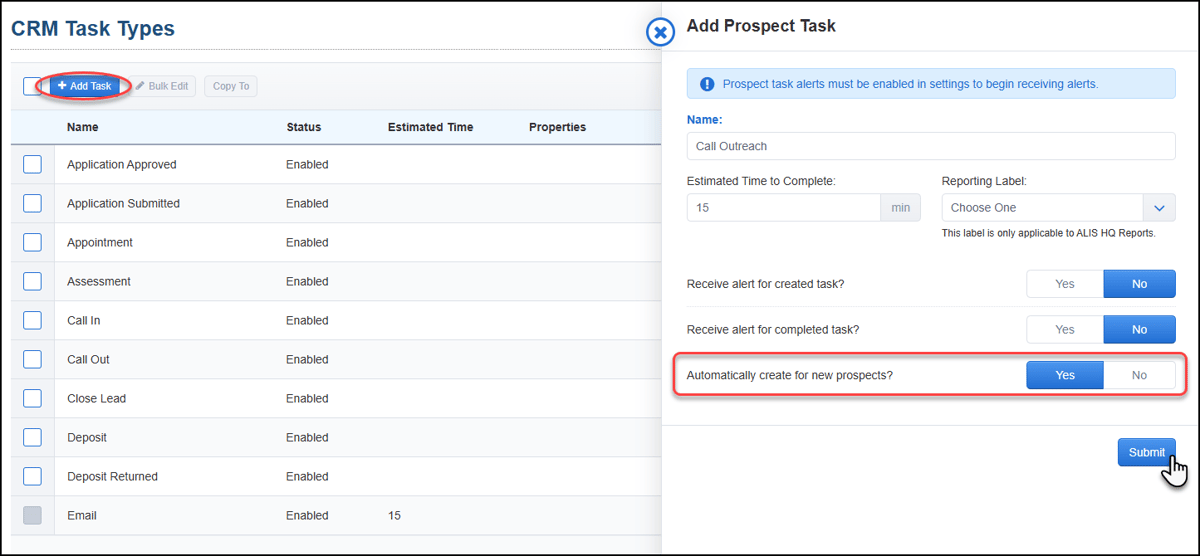 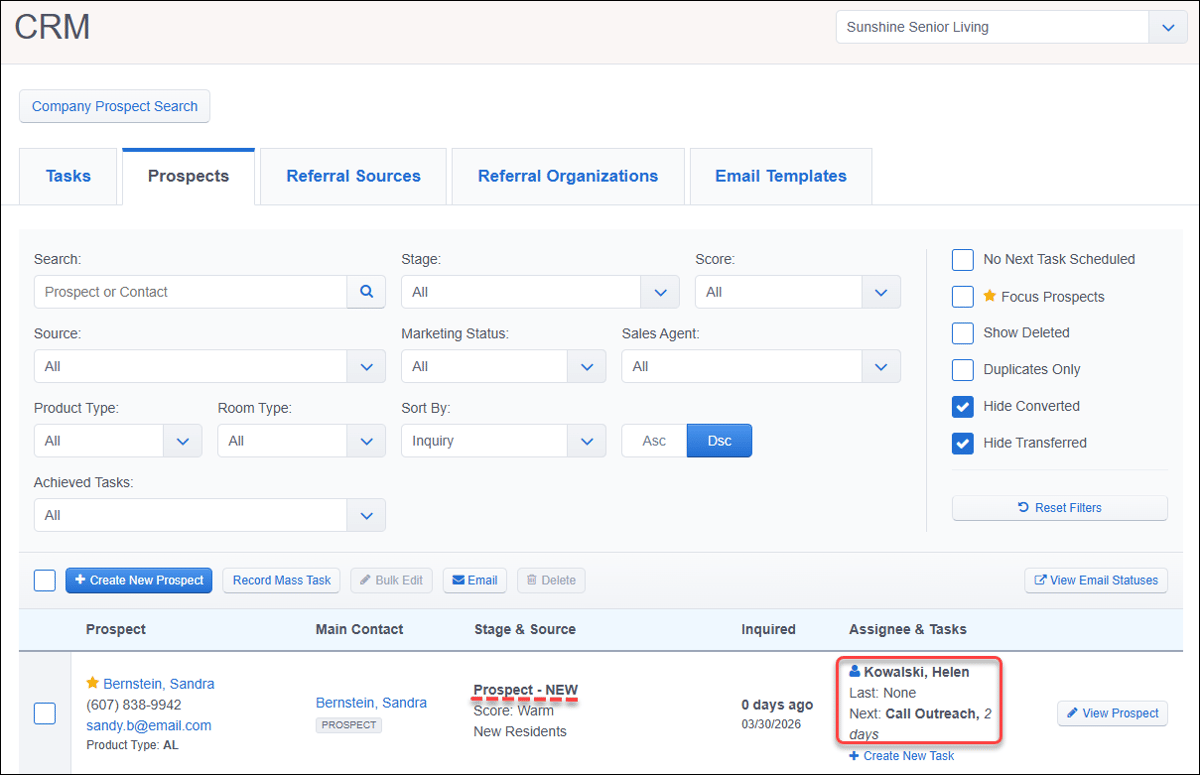 Contact your Account Manager for assistance with feature enablement or settings configuration.  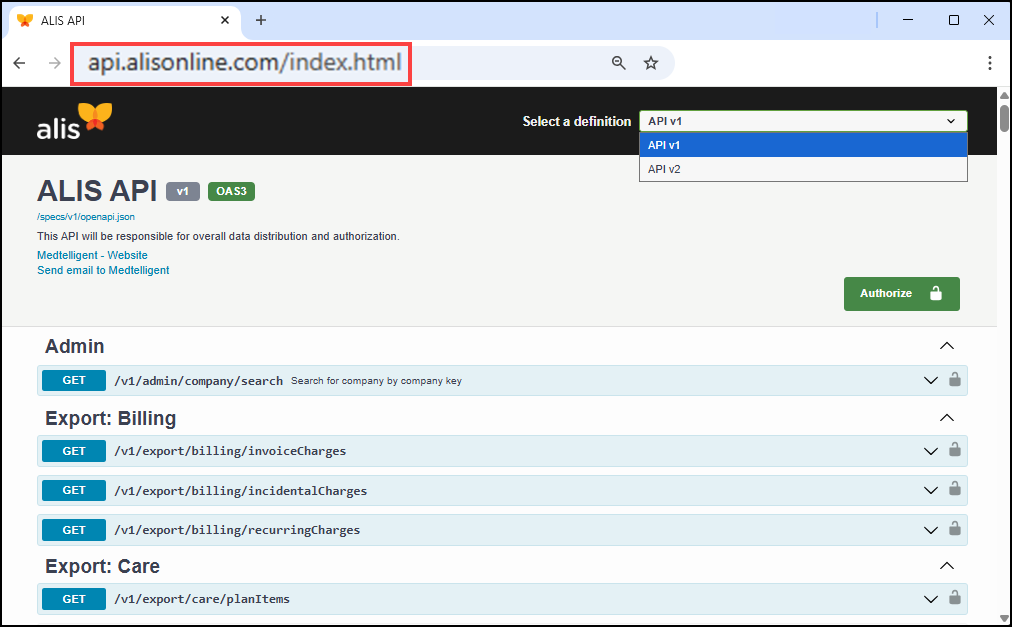 Meal Plan data available via APIAs of our April 1 release, resident Meal Plan assignments and community Meal Plan configurations are now available through the API to support accurate pricing and automation for dining integrations. Integration partners, such as POS dining systems, can retrieve both the meal plan assigned to each resident and the list of configured meal plans for a community. Expanded Care integration endpointsAs of our April 1 release, care integration APIs now include Assistance Level data for individual care tasks and care items. The new /v1/integration/care/{communityId}/assistanceLevels endpoint also allows partners to retrieve the list of configured assistance levels for a community. These updates help care integrations better organize and display resident care tasks based on the level of assistance required. New v3 HQ Occupancy export API endpointAs of our April 1 release, a new v3 export API endpooint supports filtering HQ Occupancy data by a custom date range, instead of requiring a full month selection. The /v3/export/communities/floorPlan/hqOccupancies endpoint allows integration partners to pull only the occupancy data they need while improving performance and reducing unnecessary data processing. Invoice Charges integration endpointAs of our April 1 release, a new API endpoint allows integration partners to retrieve invoice charge data for a community within a selected date range. The /v1/integration/billing/{communityId}/invoiceCharges endpoint includes detailed charge information such as item name, quantity, unit price, discounts, and payer type, making it easier to integrate billing data with external financial and reporting systems. Updated Incidents integration endpointAs of our March 25 release, the Incidents integration endpoint improves how incident data can be shared with ALIS. The new /v2/integration/incidents/{incidentId} endpoint allows partners to create incidents directly in ALIS, supporting automated feeds from fall detection systems, eCall solutions, and other clinical tools. The previous v1 endpoint is deprecated, eliminating the need to handle multiple response formats and reducing duplicate parsing logic for integration partners. New Health Profile integration endpointAs of our March 25 release, a new endpoint exposes resident functional statuses and adaptive needs to help enable tools like evacuation reports that use accurate, up-to-date resident data. The new /v1/integration/residents/{residentId}/healthProfile/functionalStatus endpoint gives access to multiple fields such as vision, ambulation, evacuation status, hearing, speech, assistive devices, and cognitive details. Updated Diagnoses and Allergies integration endpointAs of our March 18 release, the existing endpoint for Diagnoses and Allergies now includes unique identifiers and timestamps for each diagnosis record. With this /v1/export/clinical/diagnosesAndAllergies endpoint, integration partners can reliably match and track diagnoses, improving data reconciliation and reporting. Updated Resident Basic Info integration endpointAs of our March 18 release, integration partners can now access all basic resident information in a single call, reducing the need for multiple API requests. The existing /v1/integration/residents/{residentId}/basicInfo endpoint returns a full set of resident details, including Middle Name, Nickname, Pronouns, Veteran Status, and Languages. Updated Resident Contacts integration endpointAs of our March 18 release, integration partners can now accurately associate shared contacts with every relevant resident in a community. The existing /v1/integration/residents/contacts/{contactId} endpoint now returns a residentIds array, showing all residents linked to a contact. Expanded integration endpoints for CRMAs of our March 18 release, several updates improve how prospect and resident data is exposed via API to streamline CRM data integration and improve reconciliation across prospect and resident workflows:
Updated Medications integration endpointsAs of our March 11 release, integration partners can accurately link medications to residents and track medication timelines, improving workflows and reporting. The /v1/integration/residents/{residentId}/medications and medications/{medicationId} endpoints now include residentId and endDate fields. Contact your Account Manager for assistance with API access and locating specific endpoints. Want to enable an integration with us? Reach out to info@go-alis.com to get started.  Unsaved changes warning in key workflowsAs of our April 1 release, users will now see a browser "Leave site?" warning when attempting to exit while in the midst of certain workflows. This warning appears when a user tries to navigate away from the Pass Meds, Care Tracking, and Bulk Payments pages after data is already entered. Simply click the Cancel button to remain on the page and prevent losing your work. 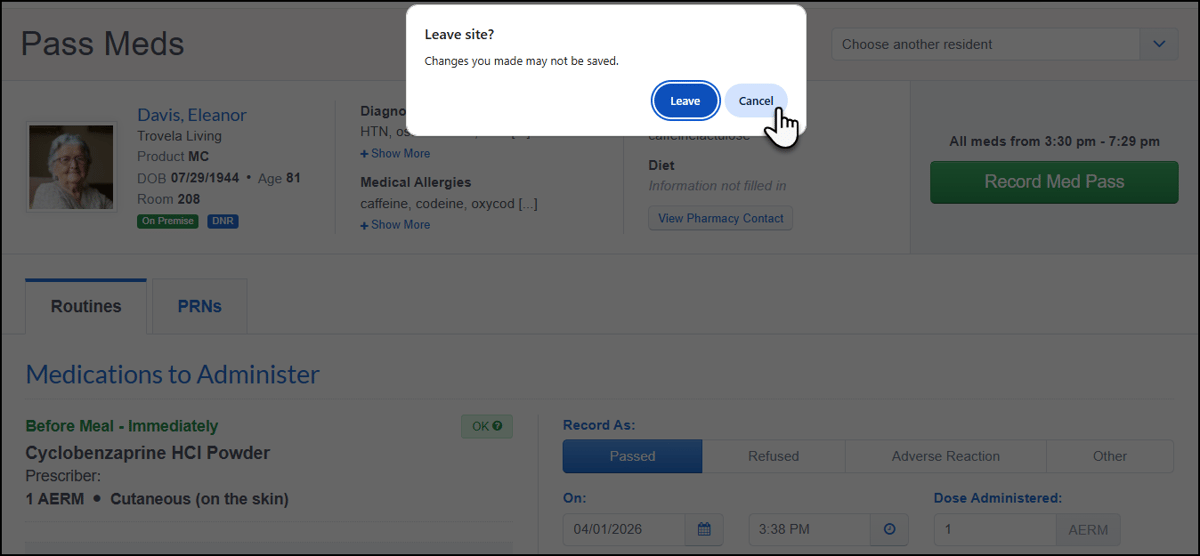 Security role permission for iStream refundsAs of our March 18 release, a new 'Perform Payment Gateway Refund' security role permission has been added for communities using ALIS Pay with iStream. This permission controls access to the Process Gateway Refund function. The new permission separates refund access from bulk payment permissions, giving more control over which users can process gateway refunds. Existing security roles that already have bulk payment permissions also have this refund permission post-release. Contact your Account Manager for assistance with updating security role permissions.  Improved Gold Occupancy LogicThis month, we enhanced the logic behind the Gold Occupancy data model to better account for resident status changes within shared units. The system now automatically generates a corresponding Move-In event when a Secondary resident's status changes to Primary to ensure move-in and move-out activity remains properly reconciled when the previous primary resident departs. Both promotion (Secondary → Primary) and demotion (Primary → Secondary) scenarios are handled consistently, improving accuracy of occupancy and financial reporting through the /hqoccupancies endpoint.  Click HERE to view our list of bug fixes in the last month's releases. |